Wednesday, January 31, 2007
To be better manage the schedule and tasks
My target for this year is to focus on managing better schedule and target.

Tuesday, September 26, 2006
Installing vmware on Ubuntu
to compile the vmware kernel module, we need to get the
apt-get install linux-headers-`uname -r`
to continue
apt-get install linux-headers-`uname -r`
to continue
Tuesday, September 19, 2006

Monday, June 19, 2006
"如何写一份好的工程师简历"
Just to blog what I read:
如何写一份好的工程师简历
2006年6月14日 上午 10:15:00
发表者:王忻,Google 工程师
最近三年作为 Google(谷歌)的软件工程师,我每周会帮人事部门审查简历,决定要不要给他们面试。Google 这几年的发展让很多许多优秀的工程师都前来申请。到目前为止,我已经看了上千份简历,有些简历留下的印象比别的好很多。尤其是最近亲戚朋友常常问我如何修改他们的简历,所以我积累了一些常见的错误避免的提议,在此跟大家交流一下。
1.谈到你做过的技术时,应该提到用的程序语言、你的个人贡献和产品细节。
有时我看到有人把过去的经验在简历上一笔带过,比如说:
• 在三人小组里,为电子邮件软件写了些 features。
这是远远不够的,看简历的人希望了解你做的工作的难度和对本公司有多少联系,所以你最好写的具体一些。譬如:
• 用 C++ 语言写了网络电子邮件的自动 backups。在三人小组里,专门负责设计和写储存服务器。从设计开始, 一年后把这个功能 feature 的用户推到了三千。
2.多讲事实, 少用形容词。
看简历的人读你的简历时,需要做判断,所以在简历里需要事实和数目。如果你写“迅速的提高了软件的操作效率”,看简历的人很难判断你成就的难度。但如果你写“在3个星期内,把软件的操作效率提高了40%” 就好多了。
有些谦虚的朋友们不愿意把话说满,所以你也可以用这个办法。你如果说自己“突出”或“在项目上常常被请去救火”,听起来难免会有点骄傲。但你也可以用不能否认的事实来说明你的观点,如“《纽约日报》评这个产品为‘突出’”,或“加入了三个原本已落后于计划的项目小组,但经过努力和组员一起把它们都按时完成了。”
3.你获得的奖、商业的荣誉或表扬、受用户欢迎的产品和你做过的有难度的业余项目都该包括在简历里。
我有位朋友在硅谷一个著名的硬件公司做了六年,她设计的 IP phone(网络电话)为公司赚了上亿的收入,被公司与商业报道多次评了奖。我有一次在旧金山的高速公路上驾车时,看到路边有她产品的广告牌;还有一次我去上海度假时,竟然发现上海公路边上也有!
不久,这位朋友决定换工作,请我看看她的简历。我惊讶的发现,她居然轻描淡写的写了一句-- "1998 – 2004:网络电话产品的硬件工程师组长" 和她的职责。
"产品赢的奖呢?它为公司赚的钱呢?" 我追问到。
"那些也该写吗?" 她说。
当然该写。
有人问,业余时间做的项目可不可以写?我觉得只要你的项目有代表性能说明对你的能力,都该包括。
4.分清主次,删掉相比之下不起眼的成绩,以免冲淡更加突出的成绩。
有朋友问,写简历是不是写的越多越好?譬如:
在甲公司做暑假实习生——
* 改善电子游戏的数值分类算法, 减少了内存要求 10%。
* 用 Java 写了 3000 行用户界面程序。
* 每周做两小时的人工测试。
你在申请软件工程师的职位时,我觉得前两点比较相关,第三点其实就不必写了。有时我看到有的简历里会提到,"按时完成了任务,产品符合原计划规格"。但读简历的人通常会认为这是理所当然的,而你把这些声明出来反而减弱简历的效果。
写一份简历不容易,但写好了也会带来成就感 (和好工作!)。 Google (谷歌)在中国广召各方面的人才,你不妨可以给我们投个简历!我们不但在信息检索方面招雇工程师,还有计算机图形、用户界面、硬件、Windows、质量保证员和系统管理员等方面。更多信息,请您访问这里。
谢谢阅读!大家感兴趣的话,下次我可以介绍“如何预备软件工程师的面试”。
如何写一份好的工程师简历
2006年6月14日 上午 10:15:00
发表者:王忻,Google 工程师
最近三年作为 Google(谷歌)的软件工程师,我每周会帮人事部门审查简历,决定要不要给他们面试。Google 这几年的发展让很多许多优秀的工程师都前来申请。到目前为止,我已经看了上千份简历,有些简历留下的印象比别的好很多。尤其是最近亲戚朋友常常问我如何修改他们的简历,所以我积累了一些常见的错误避免的提议,在此跟大家交流一下。
1.谈到你做过的技术时,应该提到用的程序语言、你的个人贡献和产品细节。
有时我看到有人把过去的经验在简历上一笔带过,比如说:
• 在三人小组里,为电子邮件软件写了些 features。
这是远远不够的,看简历的人希望了解你做的工作的难度和对本公司有多少联系,所以你最好写的具体一些。譬如:
• 用 C++ 语言写了网络电子邮件的自动 backups。在三人小组里,专门负责设计和写储存服务器。从设计开始, 一年后把这个功能 feature 的用户推到了三千。
2.多讲事实, 少用形容词。
看简历的人读你的简历时,需要做判断,所以在简历里需要事实和数目。如果你写“迅速的提高了软件的操作效率”,看简历的人很难判断你成就的难度。但如果你写“在3个星期内,把软件的操作效率提高了40%” 就好多了。
有些谦虚的朋友们不愿意把话说满,所以你也可以用这个办法。你如果说自己“突出”或“在项目上常常被请去救火”,听起来难免会有点骄傲。但你也可以用不能否认的事实来说明你的观点,如“《纽约日报》评这个产品为‘突出’”,或“加入了三个原本已落后于计划的项目小组,但经过努力和组员一起把它们都按时完成了。”
3.你获得的奖、商业的荣誉或表扬、受用户欢迎的产品和你做过的有难度的业余项目都该包括在简历里。
我有位朋友在硅谷一个著名的硬件公司做了六年,她设计的 IP phone(网络电话)为公司赚了上亿的收入,被公司与商业报道多次评了奖。我有一次在旧金山的高速公路上驾车时,看到路边有她产品的广告牌;还有一次我去上海度假时,竟然发现上海公路边上也有!
不久,这位朋友决定换工作,请我看看她的简历。我惊讶的发现,她居然轻描淡写的写了一句-- "1998 – 2004:网络电话产品的硬件工程师组长" 和她的职责。
"产品赢的奖呢?它为公司赚的钱呢?" 我追问到。
"那些也该写吗?" 她说。
当然该写。
有人问,业余时间做的项目可不可以写?我觉得只要你的项目有代表性能说明对你的能力,都该包括。
4.分清主次,删掉相比之下不起眼的成绩,以免冲淡更加突出的成绩。
有朋友问,写简历是不是写的越多越好?譬如:
在甲公司做暑假实习生——
* 改善电子游戏的数值分类算法, 减少了内存要求 10%。
* 用 Java 写了 3000 行用户界面程序。
* 每周做两小时的人工测试。
你在申请软件工程师的职位时,我觉得前两点比较相关,第三点其实就不必写了。有时我看到有的简历里会提到,"按时完成了任务,产品符合原计划规格"。但读简历的人通常会认为这是理所当然的,而你把这些声明出来反而减弱简历的效果。
写一份简历不容易,但写好了也会带来成就感 (和好工作!)。 Google (谷歌)在中国广召各方面的人才,你不妨可以给我们投个简历!我们不但在信息检索方面招雇工程师,还有计算机图形、用户界面、硬件、Windows、质量保证员和系统管理员等方面。更多信息,请您访问这里。
谢谢阅读!大家感兴趣的话,下次我可以介绍“如何预备软件工程师的面试”。
Thursday, May 18, 2006
To be technical~
After next week, I will start to be more technical. As this blog is supposed to be as technical as it should be. It should be sharing the state-of-the-art stuff.
Tuesday, February 07, 2006
## What application I need ##
- a program to keep track of tasks [a TODO list]
= allow me to add / modify the list, which might be an article, a webpage, a book etc
= allow me to prioritize them
= set a deadline
= somehow a reminder
= can sync with sunbird
- Photo album
= similar to sony's imagestation, yahoo! photo album
Reference:
http://www.imagestation.com
http://photos.yahoo.com
= allow me to add / modify the list, which might be an article, a webpage, a book etc
= allow me to prioritize them
= set a deadline
= somehow a reminder
= can sync with sunbird
- Photo album
= similar to sony's imagestation, yahoo! photo album
Reference:
http://www.imagestation.com
http://photos.yahoo.com
Blog What I read: talking about design
Luis Villa wrote:
> On 2/7/06, JP Rosevear wrote:
>> The changes that were implemented were not as radical as the
>> mockups. Basically what Nat F. showed in Paris is what was
>> implemented. The code will be released to the community soon.
>
> To ask the obvious question, why not now, and why not discussed
> publicly earlier?
So here's my (ie, not Novell's) answer.
Two words: "bike shed"[1]. Or actually, "stop energy"[2] works too. Your
pick.
Although the changes aren't nearly as radical as the original mockups,
they are a big change from the current GNOME panel menu. If we had
proposed the changes on the mailing lists, it would have started a huge
discussion about what people hated about the design ("you can't make the
panel menu depend on beagle!!!") and how it should be different. And
then we could have either (a) completely ignored everyone and done it
ourselves anyway, or (b) had a long conversation about the merits of the
design and then not actually finished the code in time for NLD10.
So we did it ourselves, and now either GNOME will like what we did, in
which case, yay, free code for GNOME, or GNOME won't like what we did,
in which case, no harm no foul for GNOME, and yay, brand differentiation
for Novell. (And anyone who yells "fork" deserves to get one stuck in them.)
An equivalent answer to the question is "because you can't do design by
committee". Everything good in GNOME is good because one person or a
small number of people working closely together made it good. Much of
what is bad in GNOME is bad because lots of people have contributed
without having a single vision of what the end result is supposed to be.
I mean, look at the stuff John Williams has been blogging about the last
week[3]:
* Evolution's UI blocking on I/O SUCKS. Due to lack of design in the
early stages of development
* Evolution's integration with gaim and tomboy RULES. Both of these
happened because specific people (ChipX86, orph) made them happen.
* Multimedia integration SUCKS. No one has ever sat down and tried
to fix the big picture. (Although I think the gstreamer team is in
the process of doing this now?)
* Apps not remembering their window size and position SUCKS. Again,
needs someone to take this problem and make it their own. I
remember xkahn was trying to fix this a few years ago, but never
finished.
* Bug-buddy SUCKS. Jacob's original UI was simple and brilliant. But
as more and more people added more and more features without
looking at the big picture, it got unwieldy. (But now a small
team is putting the simplicity back in again.)
* Deskbar applet RULES (kikidonk), dashboard RULES (Nat), and beagle
RULES (trow and joe). None of these was done *exclusively* by
those people, but each of them reflects one person's (or a few
people's) vision, as opposed to the current state of bug buddy,
which just sort of happened.
This is just another aspect of the UI "simplicity" thing. We like UIs
that try to do the right thing (metacity, epiphany/firefox, evince)
rather than UIs that try to make every possible user happy
(enlightenment, mozilla, gpdf/acroread). If you try to design something
by committee, you either have to end up with the latter sort of messy
does-everything UI, or you ignore and hence piss off a large chunk of
the committee.
And that's where we are with NLD. There is no way that everyone in the
GNOME community is going to like the changes we wanted to make. But we
did the user testing, and we believe in it, and we want to make the
changes anyway. So we're doing it. Maybe it will turn out good, and
maybe it will turn out bad. Either way, the GNOME community learns from
it. Think of it like this: wouldn't it have been cool if we could have
tried out spatialus on our users, found out that they hated it, and then
reverted back to browserlus, without ever having to actually piss off
our users? This is essentially what is going to happen with NLD10. If
Novell's customers like the NLD changes, then GNOME can adopt them. If
Novell's customers don't like the changes, then GNOME can stand off to
the side and say "yeah well, we never liked that UI anyway. Not at all
like how we would have done it." :-)
But some people will still say "But couldn't you have discussed it with
the community before doing it?" No, we couldn't. If we had, it would
either not have happened, or it would have sucked. It's inevitable. It's
not a problem with the GNOME community, it's a problem with communities
in general. The wisdom of crowds[4] only works in situations where there
are clear right and wrong answers. If you try to apply it to a design
problem, where there are many entirely different right answers, then you
end up with a wrong answer. Always[5].
So to sum up: design by committee is bad, endless debates that result in
code not actually being written are bad, design by very small teams is
good, software with a unified vision is good, trying out cool new UI
ideas is good, free code at least doesn't suck, and of course, for
Novell, not shipping NLD10 is bad. I don't think there's anything we
could have done to get more of the good without also getting more of the
bad.
-- Dan
> On 2/7/06, JP Rosevear
>> The changes that were implemented were not as radical as the
>> mockups. Basically what Nat F. showed in Paris is what was
>> implemented. The code will be released to the community soon.
>
> To ask the obvious question, why not now, and why not discussed
> publicly earlier?
So here's my (ie, not Novell's) answer.
Two words: "bike shed"[1]. Or actually, "stop energy"[2] works too. Your
pick.
Although the changes aren't nearly as radical as the original mockups,
they are a big change from the current GNOME panel menu. If we had
proposed the changes on the mailing lists, it would have started a huge
discussion about what people hated about the design ("you can't make the
panel menu depend on beagle!!!") and how it should be different. And
then we could have either (a) completely ignored everyone and done it
ourselves anyway, or (b) had a long conversation about the merits of the
design and then not actually finished the code in time for NLD10.
So we did it ourselves, and now either GNOME will like what we did, in
which case, yay, free code for GNOME, or GNOME won't like what we did,
in which case, no harm no foul for GNOME, and yay, brand differentiation
for Novell. (And anyone who yells "fork" deserves to get one stuck in them.)
An equivalent answer to the question is "because you can't do design by
committee". Everything good in GNOME is good because one person or a
small number of people working closely together made it good. Much of
what is bad in GNOME is bad because lots of people have contributed
without having a single vision of what the end result is supposed to be.
I mean, look at the stuff John Williams has been blogging about the last
week[3]:
* Evolution's UI blocking on I/O SUCKS. Due to lack of design in the
early stages of development
* Evolution's integration with gaim and tomboy RULES. Both of these
happened because specific people (ChipX86, orph) made them happen.
* Multimedia integration SUCKS. No one has ever sat down and tried
to fix the big picture. (Although I think the gstreamer team is in
the process of doing this now?)
* Apps not remembering their window size and position SUCKS. Again,
needs someone to take this problem and make it their own. I
remember xkahn was trying to fix this a few years ago, but never
finished.
* Bug-buddy SUCKS. Jacob's original UI was simple and brilliant. But
as more and more people added more and more features without
looking at the big picture, it got unwieldy. (But now a small
team is putting the simplicity back in again.)
* Deskbar applet RULES (kikidonk), dashboard RULES (Nat), and beagle
RULES (trow and joe). None of these was done *exclusively* by
those people, but each of them reflects one person's (or a few
people's) vision, as opposed to the current state of bug buddy,
which just sort of happened.
This is just another aspect of the UI "simplicity" thing. We like UIs
that try to do the right thing (metacity, epiphany/firefox, evince)
rather than UIs that try to make every possible user happy
(enlightenment, mozilla, gpdf/acroread). If you try to design something
by committee, you either have to end up with the latter sort of messy
does-everything UI, or you ignore and hence piss off a large chunk of
the committee.
And that's where we are with NLD. There is no way that everyone in the
GNOME community is going to like the changes we wanted to make. But we
did the user testing, and we believe in it, and we want to make the
changes anyway. So we're doing it. Maybe it will turn out good, and
maybe it will turn out bad. Either way, the GNOME community learns from
it. Think of it like this: wouldn't it have been cool if we could have
tried out spatialus on our users, found out that they hated it, and then
reverted back to browserlus, without ever having to actually piss off
our users? This is essentially what is going to happen with NLD10. If
Novell's customers like the NLD changes, then GNOME can adopt them. If
Novell's customers don't like the changes, then GNOME can stand off to
the side and say "yeah well, we never liked that UI anyway. Not at all
like how we would have done it." :-)
But some people will still say "But couldn't you have discussed it with
the community before doing it?" No, we couldn't. If we had, it would
either not have happened, or it would have sucked. It's inevitable. It's
not a problem with the GNOME community, it's a problem with communities
in general. The wisdom of crowds[4] only works in situations where there
are clear right and wrong answers. If you try to apply it to a design
problem, where there are many entirely different right answers, then you
end up with a wrong answer. Always[5].
So to sum up: design by committee is bad, endless debates that result in
code not actually being written are bad, design by very small teams is
good, software with a unified vision is good, trying out cool new UI
ideas is good, free code at least doesn't suck, and of course, for
Novell, not shipping NLD10 is bad. I don't think there's anything we
could have done to get more of the good without also getting more of the
bad.
-- Dan
Sunday, February 05, 2006
Chinese input as if I were in Windows
Finally, get one solution. I like the English UI as I feel it is weird if the interface in Linux is displayed as chinese.
The following contains the text for reference only. The original page is:
http://www.mrbass.org/linux/ubuntu/scim/
Ubuntu CJK Chinese Japanese Korean Input Guide
Ubuntu 5.04 Hoary SCIM Chinese, Japanese, and Korean Input Guide
You can install CJK input via ubuntuaddon or do it via internet.
Ubuntu already comes with Chinese, Japanese and Korean fonts preinstalled.
To install via internet (universe repositories must be enabled)
sudo apt-get install uim anthy scim-gtk2-immodule scim-uim scim-chinese scim-hangul scim-tables-zh scim-tables-ja scim-tables-ko
Add SCIM to startup for X11
sudo touch /etc/X11/Xsession.d/74custom-scim_startup
sudo chmod 646 /etc/X11/Xsession.d/74custom-scim_startup
echo 'export XMODIFIERS="@im=SCIM"' >> /etc/X11/Xsession.d/74custom-scim_startup
echo 'export GTK_IM_MODULE="scim"' >> /etc/X11/Xsession.d/74custom-scim_startup
echo 'export XIM_PROGRAM="scim -d"' >> /etc/X11/Xsession.d/74custom-scim_startup
echo 'export QT_IM_MODULE="scim"' >> /etc/X11/Xsession.d/74custom-scim_startup
sudo chmod 644 /etc/X11/Xsession.d/74custom-scim_startup
Press CTRL-SPACE to bring up SCIM input methods.
Next two steps are OPTIONAL (scim KDE startup and input KDE apps while in GNOME)
If you installed kubuntu-desktop (KDE) and plan on logging into KDE session do this in terminal
sudo touch ~/.kde/Autostart/startscim
echo '"#!/bin/sh"' >> ~/.kde/Autostart/startscim
echo "scim -d" >> ~/.kde/Autostart/startscim
sudo chmod 745 ~/.kde/Autostart/startscim
While using GNOME:
you can input into GNOME, GTK apps but NOT KDE apps.
While using KDE you can input GNOME, GTK and KDE apps.
So if you want to also input in KDE apps while using GNOME do the following:
sudo touch ~/.gnome2/session-manual
echo "[Default]" >> ~/.gnome2/session-manual
echo "num_clients=1" >> ~/.gnome2/session-manual
echo "0,RestartStyleHint=3" >> ~/.gnome2/session-manual
echo "0,Priority=50" >> ~/.gnome2/session-manual
echo "0,RestartCommand=scim -d" >> ~/.gnome2/session-manual
echo "0,Program=scim" >> ~/.gnome2/session-manual
This will create two SCIM keyboards under GNOME though but allows you to input in KDE apps while in GNOME.

The following contains the text for reference only. The original page is:
http://www.mrbass.org/linux/ubuntu/scim/
Ubuntu CJK Chinese Japanese Korean Input Guide
Ubuntu 5.04 Hoary SCIM Chinese, Japanese, and Korean Input Guide
You can install CJK input via ubuntuaddon or do it via internet.
Ubuntu already comes with Chinese, Japanese and Korean fonts preinstalled.
To install via internet (universe repositories must be enabled)
sudo apt-get install uim anthy scim-gtk2-immodule scim-uim scim-chinese scim-hangul scim-tables-zh scim-tables-ja scim-tables-ko
Add SCIM to startup for X11
sudo touch /etc/X11/Xsession.d/74custom-scim_startup
sudo chmod 646 /etc/X11/Xsession.d/74custom-scim_startup
echo 'export XMODIFIERS="@im=SCIM"' >> /etc/X11/Xsession.d/74custom-scim_startup
echo 'export GTK_IM_MODULE="scim"' >> /etc/X11/Xsession.d/74custom-scim_startup
echo 'export XIM_PROGRAM="scim -d"' >> /etc/X11/Xsession.d/74custom-scim_startup
echo 'export QT_IM_MODULE="scim"' >> /etc/X11/Xsession.d/74custom-scim_startup
sudo chmod 644 /etc/X11/Xsession.d/74custom-scim_startup
Press CTRL-SPACE to bring up SCIM input methods.
Next two steps are OPTIONAL (scim KDE startup and input KDE apps while in GNOME)
If you installed kubuntu-desktop (KDE) and plan on logging into KDE session do this in terminal
sudo touch ~/.kde/Autostart/startscim
echo '"#!/bin/sh"' >> ~/.kde/Autostart/startscim
echo "scim -d" >> ~/.kde/Autostart/startscim
sudo chmod 745 ~/.kde/Autostart/startscim
While using GNOME:
you can input into GNOME, GTK apps but NOT KDE apps.
While using KDE you can input GNOME, GTK and KDE apps.
So if you want to also input in KDE apps while using GNOME do the following:
sudo touch ~/.gnome2/session-manual
echo "[Default]" >> ~/.gnome2/session-manual
echo "num_clients=1" >> ~/.gnome2/session-manual
echo "0,RestartStyleHint=3" >> ~/.gnome2/session-manual
echo "0,Priority=50" >> ~/.gnome2/session-manual
echo "0,RestartCommand=scim -d" >> ~/.gnome2/session-manual
echo "0,Program=scim" >> ~/.gnome2/session-manual
This will create two SCIM keyboards under GNOME though but allows you to input in KDE apps while in GNOME.
Thursday, February 02, 2006
Oh. yes, nearly forget this blog...
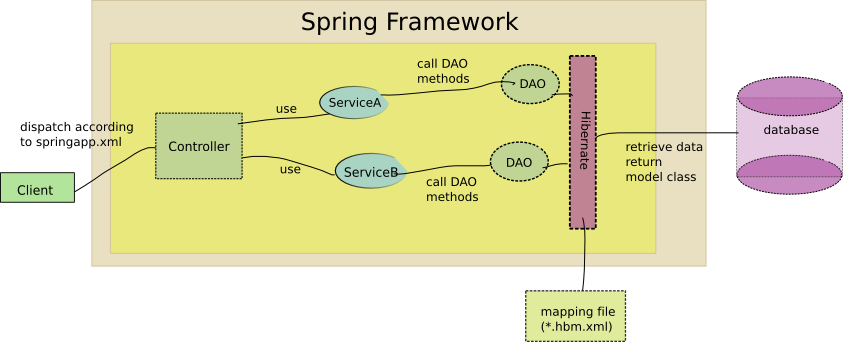
These days need to prepare the documentation for hmm project. We are going to abort this project because it is really quite time consuming and the requirement always changes without control.
The following is a brief architecture overview of hmm project:

The following is a brief architecture overview of hmm project:
Tuesday, January 24, 2006
Year 2038
just browse the web and found that the year 2038 problem...
from http://www.dewtronics.com/msdn_090798a.html
How Many GUIDs, Again?
Henrik Vallgren and Peter Schaeffer took the time to let Dr. GUI know that he's dead wrong about there being enough GUIDs for each atom in the universe to have its very own. The number of particles (not atoms) in the universe is somewhere around 1079 or so—even Dr. GUI isn't sure of exactly how many.
A GUID comprises 128 bits, so the number of GUIDs is 2128. That's only about 1038, or 100,000,000,000,000,000,000,000,000,000,000,000,000. And that's a factor of 1041 short of 1079. So a GUID could hold a unique number for only 1 out of every 1041 particles in the universe. Thankfully, each particle doesn't need its own interface ID and/or class ID. (IElectron? IQuark?) So there are still plenty of GUIDs for our uses.
Henrik's line of reasoning was especially interesting:
"Consider the sun's mass 2*10^30 kg. Assume that the sun consists of only hydrogen. One gram of hydrogen is 6*10^23 (Avogadro's number) atoms, one kilogram 6*10^26 atoms.
"The number of atoms in the suns is thus approximately 10^54 (~2^179).
"The hydrogen assumption is wrong so that number should be divided by the true average atomic weight, of which I have no idea. [But it's certainly less than 100—perhaps less than 10—so the assumption of a pure hydrogen sun doesn't affect these numbers much. Like a factor of 100 isn't much.—Dr. GUI]
Then consider billions and billions of stars in the Milky Way. And quite a few galaxies on top of that. You'll get the picture ... "
Indeed, the good doctor does get the picture. Dr. GUI begs your forgiveness 1041 times.
Note that if the GUIDs were somewhat bigger, they WOULD be big enough to give each particle its very own GUID, or PID (for particle ID). It would take about 264 bits—33 bytes for each GUID.
Thanks again to Henrik and Peter for taking the time to write.
from http://www.dewtronics.com/msdn_090798a.html
How Many GUIDs, Again?
Henrik Vallgren and Peter Schaeffer took the time to let Dr. GUI know that he's dead wrong about there being enough GUIDs for each atom in the universe to have its very own. The number of particles (not atoms) in the universe is somewhere around 1079 or so—even Dr. GUI isn't sure of exactly how many.
A GUID comprises 128 bits, so the number of GUIDs is 2128. That's only about 1038, or 100,000,000,000,000,000,000,000,000,000,000,000,000. And that's a factor of 1041 short of 1079. So a GUID could hold a unique number for only 1 out of every 1041 particles in the universe. Thankfully, each particle doesn't need its own interface ID and/or class ID. (IElectron? IQuark?) So there are still plenty of GUIDs for our uses.
Henrik's line of reasoning was especially interesting:
"Consider the sun's mass 2*10^30 kg. Assume that the sun consists of only hydrogen. One gram of hydrogen is 6*10^23 (Avogadro's number) atoms, one kilogram 6*10^26 atoms.
"The number of atoms in the suns is thus approximately 10^54 (~2^179).
"The hydrogen assumption is wrong so that number should be divided by the true average atomic weight, of which I have no idea. [But it's certainly less than 100—perhaps less than 10—so the assumption of a pure hydrogen sun doesn't affect these numbers much. Like a factor of 100 isn't much.—Dr. GUI]
Then consider billions and billions of stars in the Milky Way. And quite a few galaxies on top of that. You'll get the picture ... "
Indeed, the good doctor does get the picture. Dr. GUI begs your forgiveness 1041 times.
Note that if the GUIDs were somewhat bigger, they WOULD be big enough to give each particle its very own GUID, or PID (for particle ID). It would take about 264 bits—33 bytes for each GUID.
Thanks again to Henrik and Peter for taking the time to write.
Tuesday, January 17, 2006
Saw a comment that quite describe what programmer feels...
Source: http://www.javalobby.org/java/forums/m91982704.html
"Re: Tools for screening new Java developers
Yes, but this opens up the bigger question, doesn't it? Where technology stands in the post-bubble world.
I've seen people without degrees who could write incredible algorithms and could quote Knuth by heart. Then I've also known Computer Science degreed graduates who barely grasped programming at all. Add to this the technical schools and the "Information Technology" degree that has made it's appearance in colleges of late, and you have a horrible bloated landscape for skilled professionals.
Continuing this problem is the fact that those who enter technology are not exposed to peer-reviewed journals and a strict respect for the scientific process and experimentation to further the science, but to press release junk and market driven but vaporous software ideas that have little benefit to computer science. Software developers are more likely to Google for ideas than to search EBSCO Host. Is there really computer science anymore? Or is it all just a hacking flaming sub-culture?
I think this breeds the signifigant lack of creativity and innovation we've seen in technology in the last few years, as we have a glut of people who got in to technology because of the money and not because of the love of the science. I certainly believe that a big driver of open source development is the absolute failure of companies to manage technology professionals and their creativity. When talented people give away their work for free just to see it breathe, you know an industry is in trouble.
Add to this the fact that many IT programming jobs are, let's face it, simply to wrap a database in Java and be done with it, and you have a situation where even people who love the science may quickly become bored with it and move on to something more fulfilling.
Knowing this, seeing a sea of mediocre developers come through your door can't be that surprising. The question is: does McDonaldizing the interview process further this mediocrity or protect you against it? I suggest it furthers it.
This is a company issue that one person can't solve, but in evaluating the hiring process you have to be careful the image you generate towards the candidates as well. Those companies that treat developers as professionals tend to create an atmosphere that automatically repels the least among the group.
How many mediocre candidates do you think Google or Microsoft or Apple or Accenture gets? In contrast, how many do you think your general staff-augmenting quick-in/quick-out consulting firm gets? This can also manifest itself on a local city-wide scale, not just a national scale.
In other words, you should be compiling a list of questions to submit to your CIO, not to your candidates :-)"
"Re: Tools for screening new Java developers
Yes, but this opens up the bigger question, doesn't it? Where technology stands in the post-bubble world.
I've seen people without degrees who could write incredible algorithms and could quote Knuth by heart. Then I've also known Computer Science degreed graduates who barely grasped programming at all. Add to this the technical schools and the "Information Technology" degree that has made it's appearance in colleges of late, and you have a horrible bloated landscape for skilled professionals.
Continuing this problem is the fact that those who enter technology are not exposed to peer-reviewed journals and a strict respect for the scientific process and experimentation to further the science, but to press release junk and market driven but vaporous software ideas that have little benefit to computer science. Software developers are more likely to Google for ideas than to search EBSCO Host. Is there really computer science anymore? Or is it all just a hacking flaming sub-culture?
I think this breeds the signifigant lack of creativity and innovation we've seen in technology in the last few years, as we have a glut of people who got in to technology because of the money and not because of the love of the science. I certainly believe that a big driver of open source development is the absolute failure of companies to manage technology professionals and their creativity. When talented people give away their work for free just to see it breathe, you know an industry is in trouble.
Add to this the fact that many IT programming jobs are, let's face it, simply to wrap a database in Java and be done with it, and you have a situation where even people who love the science may quickly become bored with it and move on to something more fulfilling.
Knowing this, seeing a sea of mediocre developers come through your door can't be that surprising. The question is: does McDonaldizing the interview process further this mediocrity or protect you against it? I suggest it furthers it.
This is a company issue that one person can't solve, but in evaluating the hiring process you have to be careful the image you generate towards the candidates as well. Those companies that treat developers as professionals tend to create an atmosphere that automatically repels the least among the group.
How many mediocre candidates do you think Google or Microsoft or Apple or Accenture gets? In contrast, how many do you think your general staff-augmenting quick-in/quick-out consulting firm gets? This can also manifest itself on a local city-wide scale, not just a national scale.
In other words, you should be compiling a list of questions to submit to your CIO, not to your candidates :-)"
Friday, January 06, 2006
Leap second in kernel message...
"Clock: inserting leap second 23:59:60 UTC" was found in linux servers I managed.
Remember we have one more second at 2006 Jan 01 00:00:00 GMT
http://www.maths.tcd.ie/~dwmalone/time/leap2005.html
Remember we have one more second at 2006 Jan 01 00:00:00 GMT
http://www.maths.tcd.ie/~dwmalone/time/leap2005.html
Friday, December 23, 2005
Wednesday, December 21, 2005
Antivirus solutions on the mail server side...
Just blog the stuff I got about antivirus solutions on the mail server side:
1. clamav + clamav-milter (sendmail)
2. AMaViS - A Mail Virus Scanner (AMaViS - A Mail Virus Scanner)
3. MailScanner (http://www.mailscanner.info/) should be the easiest way to install
1. clamav + clamav-milter (sendmail)
2. AMaViS - A Mail Virus Scanner (AMaViS - A Mail Virus Scanner)
3. MailScanner (http://www.mailscanner.info/) should be the easiest way to install
Saturday, December 03, 2005
ajax framework
http://rialto.application-servers.com/demoRialto.jsp
well, using Apache license and probably, can be employed to be used in our application.
well, using Apache license and probably, can be employed to be used in our application.
Tuesday, November 15, 2005
MD5 cracker source released
http://www.stachliu.com.nyud.net:8090/collisions.html
Think if you are going to use MD5.
Think if you are going to use MD5.
Friday, October 28, 2005
A day of bug fixing...
It might be good to tell more about my job...
Now I received a list of bugs:
[hmm site]/forum/main/list/cn.page
PRC forum
• Bug: IE browser title text should be in S.Chinese. [Yes it is, I tried to fix it but time is not allowed.]
• Bug: Click 免費入會 will go to HK site.
• Bug: Click 忘記密碼 will go to HK site.
• Bug: Click 登出 will go to HK site.
• Bug: Click 更改個人資料 will go to HK site.
• Bug: Click HMM logo will go to HK site.
• Bug: Add ALT for images on left panel
• Bug: The “編輯” image is broken.
Both HK and PRC
• Bug: Search, if key in 2 words (1 word is ok) with result of several, return error
After receiving it from Sam, I starts checking the issue. Well, some is known to me.
Now I received a list of bugs:
[hmm site]/forum/main/list/cn.page
PRC forum
• Bug: IE browser title text should be in S.Chinese. [Yes it is, I tried to fix it but time is not allowed.]
• Bug: Click 免費入會 will go to HK site.
• Bug: Click 忘記密碼 will go to HK site.
• Bug: Click 登出 will go to HK site.
• Bug: Click 更改個人資料 will go to HK site.
• Bug: Click HMM logo will go to HK site.
• Bug: Add ALT for images on left panel
• Bug: The “編輯” image is broken.
Both HK and PRC
• Bug: Search, if key in 2 words (1 word is ok) with result of several, return error
After receiving it from Sam, I starts checking the issue. Well, some is known to me.
Wednesday, October 26, 2005
Allan mail server is down...
Ar. have no idea why it is down... It is the client from Corpmart... We are providing support to them...
Need to explain why it is hang.
Need to explain why it is hang.
Monday, July 04, 2005
Using Spamassassin and procmail to filter spam
Using Spamassassin and procmail to filter spam
See also: Mail Server FAQ
Table of contents
1 Procmail and Spamassassin
1.1 SpamAssassin: Automagic teaching
1.1.1 One spamassassin autolearning setup
1.1.2 An Alternative Autolearning Setup
1.1.3 Performance issues with training the bayesian filter
[edit]
Procmail and Spamassassin
We'll use the combination of procmail (http://www.procmail.org) and Spamassassin (http://www.spamassassin.org) to filter spam from our incoming mail. Procmail allows us to feed our incoming mail through different programs, then place them in different mailboxes based on the outout of those programs.
You can setup procmail and Spamassassin to be systemwide, but I prefer to do it by user - for the sake of flexibility. If you do set it up system wide (http://www.spamassassin.org/sitewide.html), the users can always customize their own rules. Refer to this IBM Developerworks article (http://www-106.ibm.com/developerworks/linux/library/l-spam/?t=gr,lnxw03=StampSpam) to get more detail on Spamassassin. Once you have installed Spamassassin and procmail, we want to setup a .procmailrc in our home directory. This will actually take the mail from Postfix, filter it through spamassassin, then deliver it to the Maildirs. For the sake of definition, procmail becomes our MDA (Mail Delivery Agent). Since procmail will be delivering to the Maildirs instead of Postfix, you need to double check this setup again.
[user@mail ~]$ cat .procmailrc
#.procmailrc - by jorge - Updated by glenn 6/8/05
# Set our default shell, which may not be necessary, as it
# uses the user's default
SHELL=/usr/bin/bash
# Set our default Maildir. You can also set the HOME variable, which
# may be set automatically by procmail
MAILDIR=/home/jorge/Maildir
# Set our default mailbox, which is where mail that doesn't have
# a sort rule applied goes. The trailing / is important.
DEFAULT=/home/jorge/Maildir/
# Set up logging. It's a good idea to let procmail log all its
# actions until you're sure it's working right.
LOGFILE=${MAILDIR}/procmail.log
LOG="--- Logging ${LOGFILE} for ${LOGNAME}, "
# Whatever recipes you'll use
# The order of the recipes is significant
# First, run everything through spamassassin. The "-P -a" tags are
# not needed with 3.0+, as they are now the defaults.
:0fw
| spamassassin
# Now that we've tagged spam, put it in its own folder
:0:
* ^X-Spam-Status: Yes
/home/jorge/Maildir/.spam/
Notice the DEFAULT directory ... that's where my mail will go, the new directory under my Maildir. That's how it shows up as new mail. If I put it in the cur directory in my Maildir, the mail would never show up as new, it would show up as already read (but we don't want that). Once you read a mail in the new directory, it moves it over to the cur directory. That's how the system keeps track of which mails are new and which ones are the 'cur'rent ones in your inbox. That's also why each subfolder has its own new,cur, and tmp directories.
Procmail is smart enough to put new mail into the "new" subdirectory for whatever Maildir folder you want it to put mail in. If you are using an IMAP server like dovecot that builds indexes, you have to omit "new/" and just leave the trailing slash (as in the script), as otherwise procmail doesn't use standard Maildir filenames, and dovecot will constantly be rebuilding a corrupted index file.
The big spamkiller is the 0fw | spamassassin line. Users of versions of spamassassin prior to 3.0 may want to add the e -a switch, which enables autowhitelisting (enabled by default in 3.0+). When you reply to people, after a while, they get put in the whitelist, and then they won't be judged so harshly the next time Spamassassin checks mail from them. If you're like me, you have some friends, that even with an autowhitelist, will score 20 or higher on the spamassassin score.
The next line puts it in the new subdirectory of my spam directory. It will then show up as new spam in our mail reader, already filed for inspection. As you guessed it, once you read the spam, it will get moved to the cur folder. I could send it directly to the .Trash folder, but I prefer to keep it seperate, and this way you can scan it everyonce in a while and catch the nifty HTML email your friends from hotmail send you. Confused? Just use the example (http://www.spamassassin.org/dist/procmailrc.example) from the Spamassassin website. You can direct the possible spam to dev/null, but this is not recommended, if you get a false positive then you'll lose that mail, that is why we created the .spam folder.
Next, we need to create a .forward file to get the email to go to procmail.
[user@mail ~]$ cat .forward
|/usr/bin/procmail
Notice that all the file does is send your incoming email to procmail. Procmail then accesses your .procmailrc file, and through it, delivers your email to the Maildir/ after running spamassasin. Without the .forward file your email will be directly delivered to your /Maildir and will avoid spamassassin entirely.
Spamassassin does a great job by default, but let's say you want to tailor it more. Create a .spamassassin directory in your home directory (mkdir .spamassassin). In there, create a user_prefs file using your favorite text editor. In time, the autowhitelister will put your whitelist in this directory too.
[user@mail ~/.spamassassin]$ cat user_prefs
# custom rules for spamassassin
score RAZOR_CHECK 4.0
score REMOVE_SUBJ 4.0
score SUBJ_REMOVE 4.0
score REPLY_REMOVE_SUBJECT 4.0
score REMOVE_IN_QUOTES 4.0
score HTML_WITH_BGCOLOR 4.0
score REALLY_UNSAFE_JAVASCRIPT 4.0
score CHARSET_FARAWAY_BODY 4.0
score NO_MX_FOR_FROM 4.0
score CTYPE_JUST_HTML 4.0
score WEB_BUGS 4.0
score SUBJ_ALL_CAPS 4.0
score LINES_OF_YELLING 4.0
score FOR_FREE 4.0
From this file, we are overriding the default rules in Spamassassin with our own custom scores. We did this because I thought the default values for these rules were too low, because who gets valid email with web bugs? So we raised the scores of these rules up. Spamassassin still keeps the default score of 5 as the definition of a spam, so these rules won't declare a mail a spam by themselves, but if they're using one of these techniques, then they're probably using other ones as well they will score higher and be tagged as spam. Refer to the Spamassassin rules list (http://www.spamassassin.org/tests.html) to find the complete list of rules.
Remember that these custom rules are in the user accounts, so if you don't want a certain account to use them, don't create a user_prefs for them. If they don't want any spam filtering whatsoever, then don't create a .procmailrc for them, Postfix will work just fine, because it was working before you even got to this step, right?
[edit]
SpamAssassin: Automagic teaching
SpamAssassin works well as a spam filter, but it works much better when it uses Bayesian filtering as opposed to depending on its ruleset, simply because of the adaptable nature of Bayesian filtering. You may be familiar with mail clients such as Thunderbird that use Bayesian filtering that you have to 'teach' your email habits too. This requires marking lots of spam as such, and unmarking lots of email labeled as spam to ham. The same thing is required with SpamAssassin, to get it to have enough data to be able to use its Bayesian component. Of course, who wants to sit at the command line, telling SpamAssassin when it was right, and when it was wrong? So, we use a simple script and crontab and some client side manipulation to automate the process.
[edit]
One spamassassin autolearning setup
In my (glenn) setup, I have spamassassin learn from my Inbox and Junk mailboxes, as I keep them nicely cleaned up and properly sorted. I don't want to deal with an overflowing Junk mailbox, but I also don't want spam cleared so quickly that I miss false positives. So, I run sa-learn every Thursday and Sunday night, and clean out spam older than 31 days at that point. I use the following learning script:
glenn@vasp:~$ cat learn.sh
#!/bin/bash
/usr/bin/sa-learn --spam ~/Maildir/.Junk/cur
/usr/bin/sa-learn --ham ~/Maildir/cur
I omit /new as that's email I haven't had a chance to properly file in case of false positives/negatives. Then, I use the following script to clean up old spam:
glenn@vasp:~$ cat cleanup-junk.sh
#!/bin/bash
# Removes all files from ~/Maildir/.Junk/cur that are older than
# 31 days ago
find ~/Maildir/.Junk/cur -mtime +30 -exec rm -f {} \;
I simply placed these in my crontab:
glenn@vasp:~$ crontab -l
# min hr dom month dow cmd
# Teach spamassassin about spam
* 4 * * 4,7 /home/glenn/learn.sh
# Clean up spam directory
* 5 * * 4,7 /home/glenn/cleanup-junk.sh
This works nicely for me, keeping spamassassin smart and preventing me from missing important emails.
[edit]
An Alternative Autolearning Setup
In my .procmailrc, I tell procmail to move mail marked as spam by Spamassassin to my $Maildir/.Trash/. This is important, because the way I am setting this up, anything that is sent to the Junk folder is deleted every 4 hours. For this reason, you should probably disable automatic moving of spam around by your email client. Or, setup two junk folders, junk_manual, which is stuff you've personally approved as spam, and junk_auto, which is mail moved by your mail client's junk mail filter and that you should probably check over before moving over to junk_manual for reading by SpamAssassin and removal from your system.
It is important to tell SpamAssassin not only what is spam, but what is ham, or legitimate email. I am running this script in my root's crontab, so I specify which home directory to go to. I don't really see why you couldn't run this as your normal user, but since SpamAssassin is run as root when called by procmail (at least, I think it is), I figure it is best to do the same here. My learning script first tells spamassassin that any read or unread junk mail is spam. I then have it hit my inbox and a number of other oft used folders on my system to tell it what is ham. It may be wise to leave out your inbox, as you may not have a chance to move spam that gets through, leading SA to believe that spam is ham, which is, of course, a no-no. This is the same reason I do not have SA read my Trash folder, which sometimes has legit email in it (though I do keep 99% of my email, so it's not a huge concern.)
[user@mail ~]$ cat ~/learn.sh
#!/bin/bash
/usr/bin/sa-learn --spam /home/user/Maildir/.Junk/new
/usr/bin/sa-learn --spam /home/user/Maildir/.Junk/cur
/usr/bin/sa-learn --ham /home/user/Maildir/new
/usr/bin/sa-learn --ham /home/user/Maildir/cur
rm /home/user/Maildir/.Junk/new/*
rm /home/user/Maildir/.Junk/cur/*
We then want to run that script every 4 hours, or however often you wish to have it run.
[user@mail ~]$ crontab -l
SHELL=/bin/sh
PATH=/usr/local/sbin:/usr/local/bin:/sbin:/bin:/usr/sbin:/usr/bin
MAILTO=""
# m h dom mon dow command
0 */4 * * * /home/user/bin/learn.sh
And now, SpamAssassin can learn from its mistakes as you simply 'delete' (move to the Junk folder) your spam clientside.
[edit]
Performance issues with training the bayesian filter
I (tm) used to use a script like those above on my linode (http://www.linode.com), but for whatever reason, the sa-learn process would suck up a lot of memory and essentially bring the linode to its knees. Without having completed the learning process. So, instead of throwing whole directories at sa-learn, I give it each mail, one at a time.
So now, my learnspam script looks like:
#!/bin/sh
## Process high scoring spam in the .Spam folder and anything leftover in .Junk
#set -x
# feed to the bayesian learner
echo "Processing Junk maildir..."
spams=`find ~/Maildir/.Junk/cur ~/Maildir/.Junk/new/ -type f -mtime +7`
for spam in $spams
do sa-learn --spam --showdots --no-sync $spam
done
rm -f $spams
echo "Processing Spam maildir..."
spams=`find ~/Maildir/.Spam/cur ~/Maildir/.Spam/new/ -type f -mtime +3`
for spam in $spams
do sa-learn --spam --showdots --no-sync $spam
done
sleep 1
rm -f $spams
And my learnham script is:
#!/bin/sh
## Process ham
if [ $# -lt 1 ]; then
echo "Usage: $0"
exit 3
fi
#set -x
# feed to the bayesian learner
for allmail in `find ~/Maildir -name cur -type d -ctime -$1 | egrep -v '(Trash|Junk|Spam)' | xargs -n 50 -idir find dir -type f -ctime -$1`
do for mail in $allmail
do echo $mail; sa-learn --ham --showdots --no-sync $mail
done
done
sleep 1
for allmail in `find ~/Maildir -name new -type d -ctime -$1 | egrep -v '(Trash|Junk|Spam)' | xargs -n 50 -idir find dir -type f -ctime -$1`
do for mail in $allmail
do echo $mail; sa-learn --ham --showdots --no-sync $mail
done
done
This may be helpful to anyone else who wants to run SA with bayesian learning on something with little memory like a linode.
See also: Mail Server FAQ
Table of contents
1 Procmail and Spamassassin
1.1 SpamAssassin: Automagic teaching
1.1.1 One spamassassin autolearning setup
1.1.2 An Alternative Autolearning Setup
1.1.3 Performance issues with training the bayesian filter
[edit]
Procmail and Spamassassin
We'll use the combination of procmail (http://www.procmail.org) and Spamassassin (http://www.spamassassin.org) to filter spam from our incoming mail. Procmail allows us to feed our incoming mail through different programs, then place them in different mailboxes based on the outout of those programs.
You can setup procmail and Spamassassin to be systemwide, but I prefer to do it by user - for the sake of flexibility. If you do set it up system wide (http://www.spamassassin.org/sitewide.html), the users can always customize their own rules. Refer to this IBM Developerworks article (http://www-106.ibm.com/developerworks/linux/library/l-spam/?t=gr,lnxw03=StampSpam) to get more detail on Spamassassin. Once you have installed Spamassassin and procmail, we want to setup a .procmailrc in our home directory. This will actually take the mail from Postfix, filter it through spamassassin, then deliver it to the Maildirs. For the sake of definition, procmail becomes our MDA (Mail Delivery Agent). Since procmail will be delivering to the Maildirs instead of Postfix, you need to double check this setup again.
[user@mail ~]$ cat .procmailrc
#.procmailrc - by jorge - Updated by glenn 6/8/05
# Set our default shell, which may not be necessary, as it
# uses the user's default
SHELL=/usr/bin/bash
# Set our default Maildir. You can also set the HOME variable, which
# may be set automatically by procmail
MAILDIR=/home/jorge/Maildir
# Set our default mailbox, which is where mail that doesn't have
# a sort rule applied goes. The trailing / is important.
DEFAULT=/home/jorge/Maildir/
# Set up logging. It's a good idea to let procmail log all its
# actions until you're sure it's working right.
LOGFILE=${MAILDIR}/procmail.log
LOG="--- Logging ${LOGFILE} for ${LOGNAME}, "
# Whatever recipes you'll use
# The order of the recipes is significant
# First, run everything through spamassassin. The "-P -a" tags are
# not needed with 3.0+, as they are now the defaults.
:0fw
| spamassassin
# Now that we've tagged spam, put it in its own folder
:0:
* ^X-Spam-Status: Yes
/home/jorge/Maildir/.spam/
Notice the DEFAULT directory ... that's where my mail will go, the new directory under my Maildir. That's how it shows up as new mail. If I put it in the cur directory in my Maildir, the mail would never show up as new, it would show up as already read (but we don't want that). Once you read a mail in the new directory, it moves it over to the cur directory. That's how the system keeps track of which mails are new and which ones are the 'cur'rent ones in your inbox. That's also why each subfolder has its own new,cur, and tmp directories.
Procmail is smart enough to put new mail into the "new" subdirectory for whatever Maildir folder you want it to put mail in. If you are using an IMAP server like dovecot that builds indexes, you have to omit "new/" and just leave the trailing slash (as in the script), as otherwise procmail doesn't use standard Maildir filenames, and dovecot will constantly be rebuilding a corrupted index file.
The big spamkiller is the 0fw | spamassassin line. Users of versions of spamassassin prior to 3.0 may want to add the e -a switch, which enables autowhitelisting (enabled by default in 3.0+). When you reply to people, after a while, they get put in the whitelist, and then they won't be judged so harshly the next time Spamassassin checks mail from them. If you're like me, you have some friends, that even with an autowhitelist, will score 20 or higher on the spamassassin score.
The next line puts it in the new subdirectory of my spam directory. It will then show up as new spam in our mail reader, already filed for inspection. As you guessed it, once you read the spam, it will get moved to the cur folder. I could send it directly to the .Trash folder, but I prefer to keep it seperate, and this way you can scan it everyonce in a while and catch the nifty HTML email your friends from hotmail send you. Confused? Just use the example (http://www.spamassassin.org/dist/procmailrc.example) from the Spamassassin website. You can direct the possible spam to dev/null, but this is not recommended, if you get a false positive then you'll lose that mail, that is why we created the .spam folder.
Next, we need to create a .forward file to get the email to go to procmail.
[user@mail ~]$ cat .forward
|/usr/bin/procmail
Notice that all the file does is send your incoming email to procmail. Procmail then accesses your .procmailrc file, and through it, delivers your email to the Maildir/ after running spamassasin. Without the .forward file your email will be directly delivered to your /Maildir and will avoid spamassassin entirely.
Spamassassin does a great job by default, but let's say you want to tailor it more. Create a .spamassassin directory in your home directory (mkdir .spamassassin). In there, create a user_prefs file using your favorite text editor. In time, the autowhitelister will put your whitelist in this directory too.
[user@mail ~/.spamassassin]$ cat user_prefs
# custom rules for spamassassin
score RAZOR_CHECK 4.0
score REMOVE_SUBJ 4.0
score SUBJ_REMOVE 4.0
score REPLY_REMOVE_SUBJECT 4.0
score REMOVE_IN_QUOTES 4.0
score HTML_WITH_BGCOLOR 4.0
score REALLY_UNSAFE_JAVASCRIPT 4.0
score CHARSET_FARAWAY_BODY 4.0
score NO_MX_FOR_FROM 4.0
score CTYPE_JUST_HTML 4.0
score WEB_BUGS 4.0
score SUBJ_ALL_CAPS 4.0
score LINES_OF_YELLING 4.0
score FOR_FREE 4.0
From this file, we are overriding the default rules in Spamassassin with our own custom scores. We did this because I thought the default values for these rules were too low, because who gets valid email with web bugs? So we raised the scores of these rules up. Spamassassin still keeps the default score of 5 as the definition of a spam, so these rules won't declare a mail a spam by themselves, but if they're using one of these techniques, then they're probably using other ones as well they will score higher and be tagged as spam. Refer to the Spamassassin rules list (http://www.spamassassin.org/tests.html) to find the complete list of rules.
Remember that these custom rules are in the user accounts, so if you don't want a certain account to use them, don't create a user_prefs for them. If they don't want any spam filtering whatsoever, then don't create a .procmailrc for them, Postfix will work just fine, because it was working before you even got to this step, right?
[edit]
SpamAssassin: Automagic teaching
SpamAssassin works well as a spam filter, but it works much better when it uses Bayesian filtering as opposed to depending on its ruleset, simply because of the adaptable nature of Bayesian filtering. You may be familiar with mail clients such as Thunderbird that use Bayesian filtering that you have to 'teach' your email habits too. This requires marking lots of spam as such, and unmarking lots of email labeled as spam to ham. The same thing is required with SpamAssassin, to get it to have enough data to be able to use its Bayesian component. Of course, who wants to sit at the command line, telling SpamAssassin when it was right, and when it was wrong? So, we use a simple script and crontab and some client side manipulation to automate the process.
[edit]
One spamassassin autolearning setup
In my (glenn) setup, I have spamassassin learn from my Inbox and Junk mailboxes, as I keep them nicely cleaned up and properly sorted. I don't want to deal with an overflowing Junk mailbox, but I also don't want spam cleared so quickly that I miss false positives. So, I run sa-learn every Thursday and Sunday night, and clean out spam older than 31 days at that point. I use the following learning script:
glenn@vasp:~$ cat learn.sh
#!/bin/bash
/usr/bin/sa-learn --spam ~/Maildir/.Junk/cur
/usr/bin/sa-learn --ham ~/Maildir/cur
I omit /new as that's email I haven't had a chance to properly file in case of false positives/negatives. Then, I use the following script to clean up old spam:
glenn@vasp:~$ cat cleanup-junk.sh
#!/bin/bash
# Removes all files from ~/Maildir/.Junk/cur that are older than
# 31 days ago
find ~/Maildir/.Junk/cur -mtime +30 -exec rm -f {} \;
I simply placed these in my crontab:
glenn@vasp:~$ crontab -l
# min hr dom month dow cmd
# Teach spamassassin about spam
* 4 * * 4,7 /home/glenn/learn.sh
# Clean up spam directory
* 5 * * 4,7 /home/glenn/cleanup-junk.sh
This works nicely for me, keeping spamassassin smart and preventing me from missing important emails.
[edit]
An Alternative Autolearning Setup
In my .procmailrc, I tell procmail to move mail marked as spam by Spamassassin to my $Maildir/.Trash/. This is important, because the way I am setting this up, anything that is sent to the Junk folder is deleted every 4 hours. For this reason, you should probably disable automatic moving of spam around by your email client. Or, setup two junk folders, junk_manual, which is stuff you've personally approved as spam, and junk_auto, which is mail moved by your mail client's junk mail filter and that you should probably check over before moving over to junk_manual for reading by SpamAssassin and removal from your system.
It is important to tell SpamAssassin not only what is spam, but what is ham, or legitimate email. I am running this script in my root's crontab, so I specify which home directory to go to. I don't really see why you couldn't run this as your normal user, but since SpamAssassin is run as root when called by procmail (at least, I think it is), I figure it is best to do the same here. My learning script first tells spamassassin that any read or unread junk mail is spam. I then have it hit my inbox and a number of other oft used folders on my system to tell it what is ham. It may be wise to leave out your inbox, as you may not have a chance to move spam that gets through, leading SA to believe that spam is ham, which is, of course, a no-no. This is the same reason I do not have SA read my Trash folder, which sometimes has legit email in it (though I do keep 99% of my email, so it's not a huge concern.)
[user@mail ~]$ cat ~/learn.sh
#!/bin/bash
/usr/bin/sa-learn --spam /home/user/Maildir/.Junk/new
/usr/bin/sa-learn --spam /home/user/Maildir/.Junk/cur
/usr/bin/sa-learn --ham /home/user/Maildir/new
/usr/bin/sa-learn --ham /home/user/Maildir/cur
rm /home/user/Maildir/.Junk/new/*
rm /home/user/Maildir/.Junk/cur/*
We then want to run that script every 4 hours, or however often you wish to have it run.
[user@mail ~]$ crontab -l
SHELL=/bin/sh
PATH=/usr/local/sbin:/usr/local/bin:/sbin:/bin:/usr/sbin:/usr/bin
MAILTO=""
# m h dom mon dow command
0 */4 * * * /home/user/bin/learn.sh
And now, SpamAssassin can learn from its mistakes as you simply 'delete' (move to the Junk folder) your spam clientside.
[edit]
Performance issues with training the bayesian filter
I (tm) used to use a script like those above on my linode (http://www.linode.com), but for whatever reason, the sa-learn process would suck up a lot of memory and essentially bring the linode to its knees. Without having completed the learning process. So, instead of throwing whole directories at sa-learn, I give it each mail, one at a time.
So now, my learnspam script looks like:
#!/bin/sh
## Process high scoring spam in the .Spam folder and anything leftover in .Junk
#set -x
# feed to the bayesian learner
echo "Processing Junk maildir..."
spams=`find ~/Maildir/.Junk/cur ~/Maildir/.Junk/new/ -type f -mtime +7`
for spam in $spams
do sa-learn --spam --showdots --no-sync $spam
done
rm -f $spams
echo "Processing Spam maildir..."
spams=`find ~/Maildir/.Spam/cur ~/Maildir/.Spam/new/ -type f -mtime +3`
for spam in $spams
do sa-learn --spam --showdots --no-sync $spam
done
sleep 1
rm -f $spams
And my learnham script is:
#!/bin/sh
## Process ham
if [ $# -lt 1 ]; then
echo "Usage: $0
exit 3
fi
#set -x
# feed to the bayesian learner
for allmail in `find ~/Maildir -name cur -type d -ctime -$1 | egrep -v '(Trash|Junk|Spam)' | xargs -n 50 -idir find dir -type f -ctime -$1`
do for mail in $allmail
do echo $mail; sa-learn --ham --showdots --no-sync $mail
done
done
sleep 1
for allmail in `find ~/Maildir -name new -type d -ctime -$1 | egrep -v '(Trash|Junk|Spam)' | xargs -n 50 -idir find dir -type f -ctime -$1`
do for mail in $allmail
do echo $mail; sa-learn --ham --showdots --no-sync $mail
done
done
This may be helpful to anyone else who wants to run SA with bayesian learning on something with little memory like a linode.
Subscribe to:
Posts (Atom)